Building a Strong Software Architecture Document
A Software Architecture Document is one of the core deliverables in any serious software initiative. It translates business intent, solution design, structural decisions, and deployment considerations into a form that can be reviewed, governed, implemented, and maintained. Without a well-structured architecture document, teams often end up with a fragmented understanding, inconsistent implementation, weak traceability, and avoidable design drift.
At a minimum, a Software Architecture Document should include a Solution Overview and one or more Architectural Views that describe the solution from different but complementary perspectives. These views help stakeholders understand the system in a way that is relevant to their concerns, whether those concerns are business alignment, functional decomposition, component responsibilities, deployment topology, or infrastructure layout.
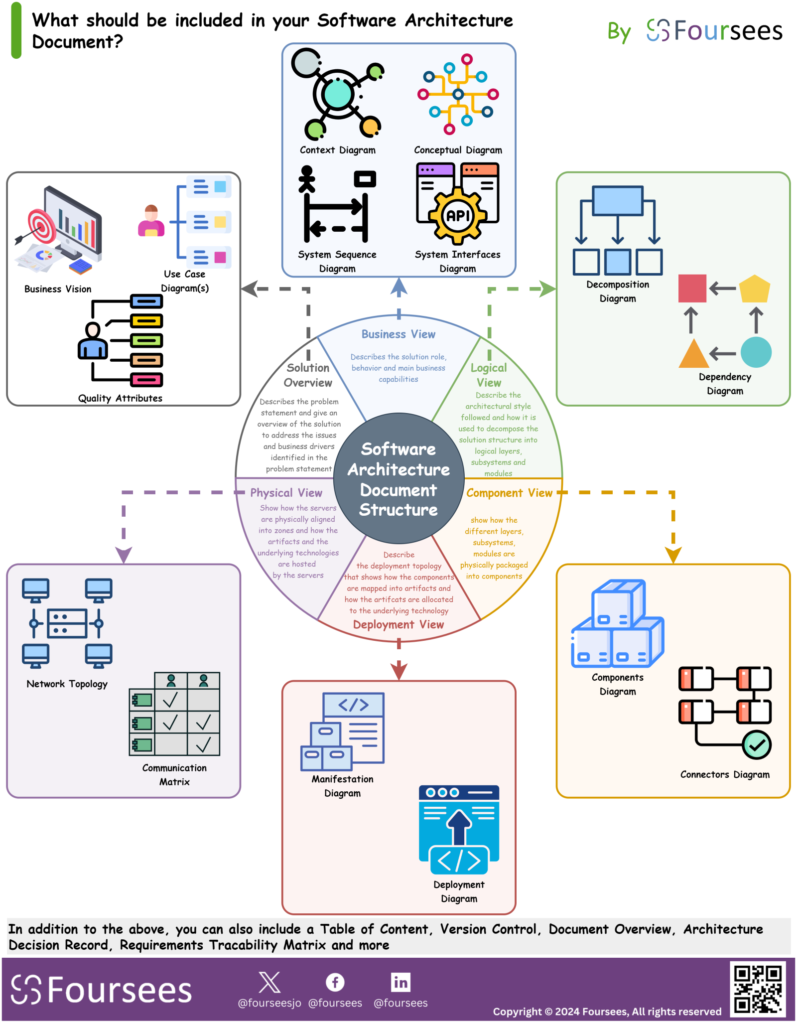
The diagram illustrates a practical structure for such a document and shows how the main views fit together to provide a complete architectural description.
Why Multiple Views Are Needed
No single diagram or narrative can fully describe a software architecture. Business stakeholders want to understand the solution’s purpose and value. Analysts and architects need to understand functions, boundaries, and dependencies. Developers need to understand components and interfaces. Infrastructure and operations teams need to understand deployment, hosting, network layout, and communication paths.
For this reason, architecture documentation should be organized into distinct views, with each view answering a different set of questions while remaining consistent with the others.
1. Solution Overview
The Solution Overview provides the starting point for the document. It explains the problem being solved, the business context, the scope of the solution, and the high-level approach being taken.
This section should help the reader quickly understand:
- What the solution is
- Why it is being built
- Which business drivers it addresses
- What scope is included or excluded
- What major constraints or assumptions shape the design
The Solution Overview acts as the anchor for the rest of the document. Without it, the later technical views may become detached from the business problem they are supposed to solve.
2. Business View
The Business View describes the solution from a business perspective. It focuses on the solution’s role, expected behavior, business capabilities, and the way it supports user or organizational goals.
This view typically includes artifacts such as:
- Business vision
- Use case diagrams
- User journeys
- Business capabilities
- Quality attributes
The purpose of this view is to show that the architecture is not just technically sound, but also aligned with business objectives and operational expectations.
3. Logical / Functional View
The Logical View, sometimes referred to as the Functional View, describes how the solution is logically structured. It explains the major subsystems, modules, layers, and functional responsibilities of the system.
This view is used to describe:
- The architectural style being followed
- Logical decomposition of the system
- Major modules and subsystems
- Internal structure and responsibilities
- Functional interactions and dependencies
Common artifacts in this section may include:
- Context diagrams
- Conceptual diagrams
- Dependency diagrams
- System interfaces diagrams
- Sequence diagrams
This view helps architects and engineering teams understand how the solution is organized from a design perspective before getting into physical deployment details.
4. Components View
The Components View shows how the logical structure is packaged into concrete components. It focuses on the physical grouping of responsibilities into deployable or developable units and clarifies how those components collaborate.
This view typically explains:
- The main software components
- connectors between components
- component responsibilities
- interfaces between components
- communication patterns
Typical artifacts include:
- Component diagrams
- Connectors diagrams
- Module dependency representations
The Components View is particularly useful for development teams because it bridges the gap between conceptual architecture and implementable structure.
5. Deployment View
The Deployment View describes how the solution is deployed into runtime environments. It shows how software artifacts map to infrastructure elements and how the application is hosted across environments.
This view should explain:
- Deployment topology
- mapping of components to environments
- runtime nodes and hosting targets
- artifact-to-environment allocation
- integration points between deployed elements
Common artifacts in this section include:
- Deployment diagrams
- Manifestation diagrams
- Environment topology representations
This view is critical for ensuring that architecture is not treated as an abstract design only, but as a design that can actually be deployed, operated, and supported.
6. Physical View
The Physical View focuses on the infrastructure and network dimension of the solution. It describes how servers, network zones, communication routes, and hosting technologies are structured to support the deployed system.
This view usually addresses:
- Network topology
- Communication matrix
- Server placement
- Environment segmentation
- Infrastructure alignment with architectural requirements
It is especially important in enterprise and regulated environments, where network boundaries, security controls, communication rules, and physical hosting arrangements have a direct impact on the viability of the solution.
Bringing the Views Together
Each architectural view addresses a different concern, but they should not be treated as isolated sections. Together, they form a coherent architecture description:
- The Solution Overview explains the purpose and context
- The Business View explains the business drivers and user perspective
- The Logical / Functional View explains the internal design structure
- The Components View explains the packaged implementation structure
- The Deployment View explains the runtime hosting model
- The Physical View explains the infrastructure and network foundation
When these views are aligned, the document provides a strong basis for design assurance, solution governance, implementation planning, and future change.
Additional Sections That Strengthen the Document
Beyond the minimum structure, a Software Architecture Document can also include supporting sections such as:
- Table of contents
- Version control
- Document overview
- Architecture decisions
- Assumptions and constraints
- Requirements traceability matrix
- Risks and issues
- Standards and principles
- Non-functional requirements mapping
These additions improve traceability, governance, and maintainability, especially for large or high-impact solutions.
Final Thought
A Software Architecture Document should do more than describe technology choices. It should explain the solution in a structured, multidimensional way that connects business intent to design logic, implementation structure, deployment topology, and physical hosting reality.
At a minimum, it should include a Solution Overview and a set of Architectural Views covering the business, logical, component, deployment, and physical perspectives. When prepared properly, this document becomes a practical tool for communication, decision-making, governance, and delivery alignment across the full solution lifecycle.
Ready to apply these insights?
Our architects are ready to help you design the path forward.
Book a Consultation